in And not in OperatorsAre there any questions before I begin?
After I finish talking I will pass out the papers for today's graded quiz.
I have posted a solution to homework 2 here.
Let's take a look.
I have posted homework 4 here.
It is due this coming Sunday at 11:59 PM.
Today I will talk more about dictionararies and their methods.
I will also discuss how numbers or string can be automatically converted to booleans in some situations.
print statements
>>> students = {}
>>> students["09329034"] = ("Jane", "Adams","jadamsjadams@yahoo.com")
>>> students["09929034"] = ("Alexander", "Smith","bigboy@hotmail.com")
>>> students["05431692"] = ("Christopher", "Cannon","chris@nomail.com")
>>> students["07511379"] = ("Joseph", "Malloney","jmaljoem@yahoo.com")
>>> students["04175276"] = ("James", "Reynolds","jrjim.reynolds@gmail.com")
for loop ...
>>> for id in students:
...     print(id, students[id])
...
09329034 ('Jane', 'Adams', 'jadamsjadams@yahoo.com')
09929034 ('Alexander', 'Smith', 'bigboy@hotmail.com')
05431692 ('Christopher', 'Cannon', 'chris@nomail.com')
07511379 ('Joseph', 'Malloney', 'jmaljoem@yahoo.com)
04175276 ('James', 'Reynolds', 'jrjim.reynolds@gmail.com')
sorted
sorted takes as an argument anything
that can be used in a for loop ...
sorted on a list of numbers
>>> nums = [5,8,2,6,1,9,3]
>>> sorted(nums)
[1, 2, 3, 5, 6, 8, 9]
>>> sorted(students)
['04175276', '05431692', '07511379', '09329034', '09929034']
sorted in a for loop over
a dictionary
>>> for id in sorted(students):
...     print(id, students[id])
...
04175276 ('James', 'Reynolds', 'jrjim.reynolds@gmail.com')
05431692 ('Christopher', 'Cannon', 'chris@nomail.com')
07511379 ('Joseph', 'Malloney', 'jmaljoem@yahoo.co')
09329034 ('Jane', 'Adams', 'jadamsjadams@yahoo.com')
09929034 ('Alexander', 'Smith', 'bigboy@hotmail.com')
sorted on a dictionary to create a sorted list
of keys
>>> sorted_ids = sorted(students)
>>> sorted_ids
['04175276', '05431692', '07511379', '09329034', '09929034']
>>> sorted_ids.reverse()
>>> sorted_ids
['09929034', '09329034', '07511379', '05431692', '04175276']
>>> for id in sorted_ids:
...     print(id, students[id])
...
09929034 ('Alexander', 'Smith', 'bigboy@hotmail.com')
09329034 ('Jane', 'Adams', 'jadamsjadams@yahoo.com')
07511379 ('Joseph', 'Malloney', 'jmaljoem@yahoo.com')
05431692 ('Christopher', 'Cannon', 'chris@nomail.com')
04175276 ('James', 'Reynolds', 'jrjim.reynolds@gmail.com')
in And not in Operatorsin
operator
>>> numbers
[1, 2, 3, 4, 5]
>>> 5 in numbers
True
>>> 6 in numbers
False
not in operator tells us whether a value is
not found in a list
>>> 5 not in numbers
False
>>> 6 not in numbers
True
not and in together make a single
operator
>>> words_integers
{'three': 3, 'five': 5, 'two': 2, 'one': 1, 'four': 4}
>>> "three" in words_integers
True
>>> 3 in words_integers
False
del statement
del DICTIONARY_NAME[KEY]
where DICTIONARY_NAME is a variable that points
to the dictionary object
>>> words_integers
{'three': 3, 'five': 5, 'two': 2, 'one': 1, 'four': 4}
>>> del words_integers["five"]
>>> words_integers
{'three': 3, 'two': 2, 'one': 1, 'four': 4}
del words_integers["six"]
Traceback (most recent call last):
  File "<stdin>", line 1, in <module>
KeyError: 'six'
len function can be used with a dictionary
>>> email_addresses
{'Chris': 'chrisk@yahoo.com', 'Alan': 'alanh@gmail.com'}
>>> len(email_addresses)
2
>>> words_integers
{'five': 5, 'one': 1, 'six': 6, 'two': 2, 'four': 4, 'three': 3}
>>> len(words_integers)
6
bool ...
if and while statements both need
boolean expressions
andornotif or while statement
value == 0
answer == ""
num != 0
>>> value = ""
>>> if value:
...     print("True")
... else:
...     print("False")
...
False
>>> value = "x"
>>> if value:
...     print("True")
... else:
...     print("False")
...
True
>>> def true_or_false(value):
...     if value:
...         print("True")
...     else:
...         print("False")
...
>>> true_or_false(0)
False
>>> true_or_false(0.0)
False
>>> true_or_false(1)
True
>>> true_or_false(4)
True
>>> true_or_false(-1)
True
>>> true_or_false(-100)
True
>>> file = open("students.txt", "r")
>>> file
<_io.TextIOWrapper name="students.txt" mode="r" encoding="UTF-8">
>>> true_or_false(file)
True
NoneNone points to nothingNone is false
>>> true_or_false(None)
False
>>> strings_integers = {"one":1, "two":2, "three":3}
>>> strings_integers["three"]
3
>>> integers_strings = {1:"one", 2:"two", 3:"three"}
>>> integers_strings[3]
"three"
>>> floats_strings   = {1.0:"one", 2.0:"two", 3.0:"three"}
>>> floats_strings[3.0]
"three"
>>> tuples_integers  = {(1,1):1, (2,2):2, (3,3):3}
>>> tuples_integers[(3,3)]
3
>>>
>>> lists_integers   = {[1,1]:1, [2,2]:2, [3,3]:3}
Traceback (most recent call last):
  File <stdin>, line 1, in <module>
TypeError: unhashable type: "list"
>>> jumble = {1:1, 2:2.0, 3:"three", 4:(4,4), 5:[5]}
>>> for key in jumble:
...    print(jumble[key])
...
1
2.0
three
(4, 4)
[5]
>>> jumble_2 = {1:1, 2.0:2, "3":3}
>>> for key in jumble_2:
...     print(jumble_2[key])
...
1
2
3
| Method | Description |
|---|---|
| clear() | Clears the contents of a dictionary. |
| get(key) | Gets the value associated with a specified key. If the key is not found, the method does not raise an exception. Instead, it returns a default value. You can give the default value as a second argument. |
| pop(key) | Returns the value associated with a specified key and removes that key-value pair from the dictionary. If the key is not found, the method returns a default value. You can give the default value as a second argument. |
| popitem() | Returns the last key-value pair added to the dictionary as a tuple. |
| items() | Returns all the keys in a dictionary and their associated values. |
| keys() | Returns all the keys in a dictionary. |
| values() | Returns all the values in the dictionary. |
clear method removes all entries from a directory
>>> quiz_scores
{"Mary Jones": [98, 95, 93, 92], "Tim Tyler": [88, 81, 79, 85], "John Smith": [100, 90, 85]}
>>> quiz_scores.clear()
>>> quiz_scores
{}
>>> quiz_scores = {}
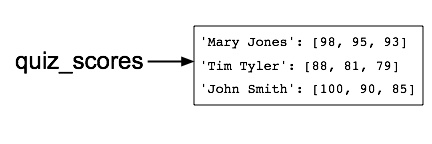
id function
>>> quiz_scores
{"John Smith": [100, 90, 85], "Tim Tyler": [88, 81, 79], "Mary Jones": [98, 95, 93]}
>>> id(quiz_scores)
139691305684744
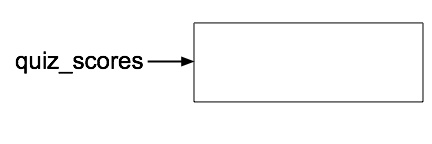
>>> quiz_scores.clear()
>>> id(quiz_scores)
140083427949384
>>> quiz_scores
{}
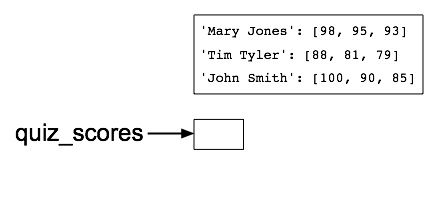
quiz_scores = {}
id on
quiz_scores
>>> id(quiz_scores)
140083428105992
>>> scores = quiz_scores["Mary Jones"]
>>> scores
[98, 95, 93]
>>> scores = quiz_scores["Mary Jonez"]
Traceback (most recent call last):
  File <stdin>, line 1, in <module>
KeyError: "Mary Jonez"
>>> scores = quiz_scores.get("Mary Jones")
>>> scores
[98, 95, 93]
None
>>> scores = quiz_scores.get("Mary Jonez")
>>> print(scores)
None
False in an
if statementfor loop there would be
no reason to use get
>>> for key in quiz_scores:
...    print(key, ":", quiz_scores[key])
...
Tim Tyler : [88, 81, 79]
Mary Jones : [98, 95, 93]
John Smith : [100, 90, 85]
>>> def get_score(key):
...    score = quiz_scores.get(key)
...    if score:
...       return score
...    else:
...       print(key, "is not a valid key")
...
>>>
>>> get_score("Mary Jones")
[98, 95, 93]
>>> get_score("Mary Jonez")
Mary Jonez is not a valid key
None...
>>> quiz_scores
{"Mary Jones": [98, 95, 93], "Tim Tyler": [88, 81, 79], "John Smith": [100, 90, 85]}
>>> quiz_scores.pop("Mary Jones")
[98, 95, 93]
>>> quiz_scores
{"Tim Tyler": [88, 81, 79], "John Smith": [100, 90, 85]}
None
>>> quiz_scores
{'Tim Tyler': [88, 81, 79], 'John Smith': [100, 90, 85]}
>>> quiz_scores.popitem()
('John Smith', [100, 90, 85])
>>> quiz_scores
{'Tim Tyler': [88, 81, 79]}
>>> names_usernames
{"Mary Jones": "mjones", "John Smith": "wombat", "Tim Tyler": "ttyler"}
>>> items = names_usernames.items()
>>> items
[('Mary Jones', 'mjones'), ('John Smith', 'wombat'), ('Tim Tyler', 'ttyler')]
>>> names_usernames
{"Mary Jones": "mjones", "Tim Tyler": "ttyler", "John Smith": "wombat"}
>>> items = names_usernames.items()
>>> items
dict_items([("Mary Jones", "mjones"), ("Tim Tyler", "ttyler"), ("John Smith", "wombat")])
dict_items?dict_items are one member of a family of data types called
view objects
>>> items = names_usernames.items()
>>> type(items)
<type "list">
>>> names_usernames["Fred Farnsworth"] = "fredster"
>>> names_usernames
{"Fred Farnsworth": "fredster", "Mary Jones": "mjones", "John Smith": "wombat", "Tim Tyler": "ttyler"}
>>> items
[("Mary Jones", "mjones"), ("John Smith", "wombat"), ("Tim Tyler", "ttyler")]dict-items view object will show the new
entry
>>> names_usernames
{"Mary Jones": "mjones", "Tim Tyler": "ttyler", "John Smith": "wombat"}
>>> names_usernames["Fred Farnsworth"] = "fredster"
>>> items
dict_items([("Mary Jones", ("Tim Tyler", "ttyler"), ("John Smith", "wombat"), "mjones"), ("Fred Farnsworth", "fredster")])
>>> items[0]
Traceback (most recent call last):
  File "<stdin>", line 1, in <module>
TypeError: "dict_items" object does not support indexing
for loop
for pair in items:
...    print(pair)
...
("Mary Jones", "mjones")
("John Smith", "wombat")
("Tim Tyler", "ttyler")
("Fred Farnsworth", "fredster")
>>> names_usernames.keys()
["Fred Farnsworth", "Mary Jones", "John Smith", "Tim Tyler"]
>>> names_usernames.keys()
dict_keys(["Mary Jones", "John Smith", "Tim Tyler", "Fred Farnsworth"])
>>> names_usernames.values()
["fredster", "mjones", "wombat", "ttyler"]
dict_values view object
>>> names_usernames.values()
dict_values(["mjones", "wombat", "ttyler", "fredster"])
<li class="flat"><a href="#collecting_testing_assignments">Collecting and Testing Assignments</a></li>
<li class="flat"><a href="#notifying_missing_work">Notifying You About Missing Work</a></li>
<li class="flat"><a href="#late_work">Late Work</a>
"collecting_testing_assignments": "Collecting and Testing Assignments"
"notifying_missing_work": "Notifying You About Missing Work"
"late_work": "Late Work"
<h4 class="topic" id="collecting_testing_assignments">Collecting and Testing Assignments</h4>
<h4 class="topic" id="notifying_missing_work">Notifying You About Missing Work</h4>
<h4 class="topic" id="late_work">Late Work</h4>
"collecting_testing_assignments": "Collecting and Testing Assignments"
"notifying_missing_work": "Notifying You About Missing Work"
"late_work": "Late Work"