IT 117: Intermediate Scripting
Class 16
Review
New Material
Microphone
Questions
Are there any questions before I begin?
Homework 7
I have posted homework 7
here.
It is due this Sunday at 11:59 PM.
Midterm
I will start scoring the Midterm tomorrow.
I hope to be finished by Monday.
Quiz Next Week
There will be a graded quiz next week.
It will cover material from today's class and
Class 13.
Today's Class
Today I will show you how Python can work with a database
engine.
I will also begin discussing the ethical issues raised by
information technology.
Announcements
Today we will be discussing how to use Python to access a SQLite
database.
I am doing this to show you how Python can be used with other sources of information.
In order to do this, I need to discuss some features of Structured Query Language
(SQL).
This is not a database course, so you will not be required to remember this
on the Final Exam.
Review
Reusing Functions with Modules
- When writing a script I usually define several functions
- Sometimes I realize these functions can be used in other scripts
- When this happens, I copy the function into a
module
...
- so I can use these functions in other places
- Here are some of the functions in my
utilities.py module
import sys

# opens a file for reading if it can
# otherwise quits
def open_file_read(filename):
    try:
        file = open(filename, "r")
    except:
        print("Cannot open", filename)
        sys.exit()
    else:
        return file

# opens a file for writing
def open_file_write(filename):
    try:
        file = open(filename, "w")
    except:
        print("Could not open", filename)
        sys.exit()
    else:
        return file
Importing Modules
Dot Notation with Module Functions
Attendance
New Material
- Python has many modules that can be used for specific purposes
- This is one reason Python is so popular
- In IT 116 you saw that Python comes with the random
module
- This modules contains function for creating
pseudorandom numbers
- Pseudorandom numbers are very important in gaming ...
- and in creating simulations
- Statistics is important in many areas of business, science and economics
- The statistics module is part of the Python
Standard Library
- Similarly, Python has modules that work with various database products
Working with Data
- Computers are particularly good at dealing with large amounts of data
- This data is contained in files
- The data in files usually has a structure
- But that structure is not contained in the file itself
- You have to know the structure before you can process the data
- Files must be read into memory and stored in some sort of
data structure
- A data structure is an arrangement of data ...
- that allows you to get information efficiently
- Lists and dictionaries are data structures
- If the amount of data is large and needs to be used repeatedly ...
- it is usually stored in a
database
- Modern database products usually employ
SQL (Structured Query Language)
Database Products
- There a many database products in common use
- Oracle
- MySQL
- DB2
- Postgres
- SQL Server
- Each of these products uses SQL ...
- which is a language designed to work with relational databases
- All of these products run as stand alone services on a server
- They need a database administrator to keep them running smoothly
- To use a database you must obtain an account from the administrator
- You also need permission from the administrator ...
- to access the different parts of the database
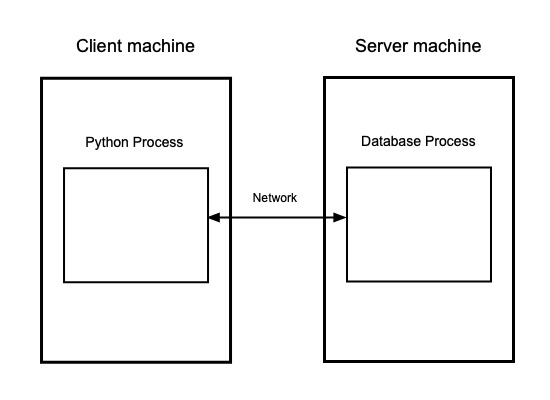
- Each of these database engines runs inside its own
process
- Client applications run on other machines ...
- which talk to the server over a network
- The situation looks like this
SQLite
- The database products listed above are used in big commercial enterprises
- Such environments always have database administrators
- You need permission from the administrator to use these databases
- This makes it harder to experiment ...
- and try new things
- SQLite is an open source package that take a different approach
- SQLite actually runs inside the same process ...
- that runs the program that calls it
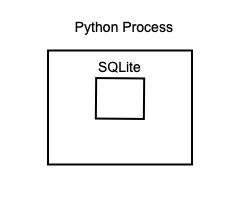
- This makes SQLite much more flexible
- This is why it is used in the Mac OS ...
- and many mobile phone applications
- The information in a SQLite database is stored in a single file
- The programmer writing the application creates this file
- There is no system administrator involved
- SQLite is not good for large applications ...
- where many users need simultaneous access
- But it is a great learning environment
- I will be using SQLite to show how Python can work with a database
- I will do this using the sqlite3 module
The SQLite Command Line
Database Structure
- All the data in a SQL database are stored in tables
- The rows of a database are individual
records
...
- and the columns are
fields
within that record
- Here is a table whose records contain student data
sqlite> select * from students;
student_id  first_name  last_name   umb_email              user_name   college
----------  ----------  ----------  ---------------------  ----------  ----------
09329034    Jane        Adams       Jane.Adams001@umb.edu  jadams      CSM
03687480    Alexander   Smith       Alexander.Smith001@um  bigboy      CM
05431692    Christophe  Cannon      Christopher.Cannon001  ccannon     CSM
07511379    Joseph      Malloney    Joseph.Malloney001@um  jmal        CSM
07518979    Fatih       Jones       Fatih.Jones001@umb.ed  fjones      CM
04175276    James       Reynolds    James.Reynolds001@umb  jr          CSM
- Different tables contain data on different things
- Here is a table listing the students enrolled in different sections
sqlite> select * from enrollments;
id          course_id   section_no  semester_id  student_id
----------  ----------  ----------  -----------  ----------
1            it116      1            s17          05431692
2            it116      1            s17          09329034
3            it116      1            s17          07518979
4            it244      1            s17          07511379
5            it244      1            s17          09329034
6            it244      1            s17          04175276
7            it116      1            sum17        03687480
8            it116      1            sum17        07511379
9            it116      1            sum17        07518979
10           it117      1            f18          07518979
11           it117      1            f18          05431692
12           it117      1            f18          09329034
- Tables usually have one column where the values are unique
- This column is called the
primary key
- The values in this column are usually integers ...
- and are assigned automatically by the database
- One advantage of this structure is that it eliminates data duplication
- I do not have to store the first and last name of a student in the
enrollment table ...
- because that data is held in the students table
- To get the data for a student, all you need is the primary key ...
- of the appropriate record in the students table
- The column that stores this key in enrollment is
called a
foreign key
Data Checking
- Every column in a database has certain restrictions on the values it can hold
- The database will not allow you to enter the wrong kind of data in a field
- The most elementary restriction is the
data type
of the value
- Here is the definition for the student table
create table students
(   student_id  text primary key unique,
    first_name  text not null,
    last_name   text not null,
    umb_email   text not null unique,
    email       text unique,
    user_name   text unique,
    college     text
);
- Most database tables also allow you to set additional restrictions on fields
- For example, you can restrict the values to a specific range ...
- or insist that values be dates
Queries
- To get information from a table you write a SQL
query
- A SQL query often has the following form
select COLUMN_LIST from TABLE_NAME where RESTRICTIONS;
- To get the student ID, first and last name of students in the College
of Management ...
- I would write
sqlite> select student_id, first_name, last_name from students where college = "CM";
student_id  first_name  last_name
----------  ----------  ----------
03687480    Alexander   Smith
07518979    Fatih       Jones
- All SQL statements MUST have a semicolon, ; ,
at the end
Joins
- The query above only shows data from one table
- But sometimes we want results that contain data from more than one table
- What if I wanted the name and email address of every student in IT 117 for
Fall 2017?
- I can get some of this information from the
enrollments table
sqlite> select * from enrollments where course_id = "it117" and semester_id = "f18";
id          course_id   section_no  semester_id  student_id
----------  ----------  ----------  -----------  ----------
10          it117       1           f18          07518979
11          it117       1           f18          05431692
12          it117       1           f18          09329034
- But the name and email address are stored in the students table
- I need to write a query which collects data from two different tables
- A query that gets data from more than one table is called a
join
- There are different kinds of joins, but the
inner_join
is the most common
- An inner join returns information in two different tables ...
- based on key values they have in common
- In the results above, the id column is the
primary key for enrollments
- But course_id, semester_id
and student_id are primary keys in other tables
- When a table contains a key value from another table it is called a foreign key
- To get the names and email address of the students in IT 117 in Fall 2017 ...
- I can use the student_id from the
enrollments table ...
- and the semester_id to limit the
output to Fall 2017
- Here is the query
sqlite> select enrollments.student_id, students.first_name, students.last_name, students.umb_email
   ...> from enrollments
   ...> inner join students
   ...> on enrollments.student_id = students.student_id
   ...> where course_id = "it117" and semester_id = "f18";
student_id  first_name  last_name   umb_email
----------  ----------  ----------  ----------------------
07518979    Fatih       Jones       Fatih.Jones001@umb.edu
05431692    Christophe  Cannon      Christopher.Cannon001@
09329034    Jane        Adams       Jane.Adams001@umb.edu
- Since the query uses data from two different tables ...
- I have to write the table name before the field name
Views
- The query above is quite complicated
- And I might want to run a similar query each semester ...
- for each course I teach
- Instead of writing new queries, I can create a
view
to get the data I want
- A view is predefined query that is stored in the database
- You can run a query on a view as if it were a table
- So a view is like a virtual table
- Here is the definition of a view called students_enrollments_vw
- It combines data from both students
and enrollments
create view students_enrollments_vw as
    select  enrollments.student_id,
            students.first_name,
            students.last_name,
            students.umb_email,
            enrollments.course_id,
            enrollments.semester_id
        from enrollments inner join students
            on enrollments.student_id = students.student_id;
- This view is very long and complicated
- But now that I have it, getting data for students in a section is much easier
sqlite> select first_name, last_name, umb_email from students_enrollments_vw
   ...> where course_id = "it117" and semester_id = "f18";
first_name  last_name   umb_email
----------  ----------  ----------------------
Fatih       Jones       Fatih.Jones001@umb.edu
Christopher  Cannon      Christopher.Cannon001@
Jane        Adams       Jane.Adams001@umb.edu
Changing Data in a Table
- There are special SQL commands for changing data in a table
- There are three ways you can change what is in a table
- Add a record
- Change the values in a record
- Delete a record
- Each of these operations has its own SQL command
Adding a Record to a Table
- To add a record to a table you must use the SQL
insert
command ...
- which has the following syntax
insert into TABLE_NAME (COLUMN_LIST) values (VALUE_LIST);
- If you are adding a row with values for every column ...
- you can skip the (COLUMN_LIST)
- Let's say I want to add a student to a Fall 2017 section of IT 244
- Here is the definition of the enrollments table
create table enrollments
(   id          integer primary key,
    course_id   text not null references courses(course_id),
    section_no  integer not null,
    semester_id text not null references semesters(semester_id),
    student_id  text not null references students(student_id),
    unique (student_id, course_id, semester_id)
);
- A table field that is marked
integer primary key is special
- SQLite will automatically supply the next available integer value in this field ...
- but only if you use the special value
null in your insert statement
- null is a special database value that means no information
- To insert a new row into enrollments I can write
sqlite> insert into enrollments values(null, "it244", 1, "f18", "05431692");
- If you get no error message the command was successful
- You can confirm that the row has been added with a query
sqlite> select * from enrollments where course_id = "it244" and semester_id = "f18";
id          course_id   section_no  semester_id  student_id
----------  ----------  ----------  -----------  ----------
13          it244       1           f18          05431692
Changing the Values in a Record
- A SQL update command is used to change values
- It has the following format
update TABLE_NAME set COLUMN_VALUE_PAIRS where CONDITION
- COLUMN_VALUE_PAIRS are a column name, an equal
sign, and a value
- If I wanted to change the username for Alexander Smith to "alex" I would
write
update students set user_name = "alex" where student_id = "03687480";
- If you get no error message, the change was successful
- But a query will show that the change worked
select * from students where student_id = "03687480";
student_id  first_name  last_name   umb_email                   user_name   college
----------  ----------  ----------  --------------------------  ----------  ----------
03687480    Alexander   Smith       Alexander.Smith001@umb.edu  alex        CM
- You can change more than one record with a single update command
- If it wanted to change the college of students not in the College of
Management ...
- to the College of Science and Mathematics
- I would write
sqlite> update students set college = "CSM" where college != "CM";
sqlite> select * from students where college != "CM";
student_id  first_name  last_name   umb_email              user_name   college
----------  ----------  ----------  ---------------------  ----------  ----------
09329034    Jane        Adams       Jane.Adams001@umb.edu  jadams      CSM
03687480    Alexander   Smith       Alexander.Smith001@um  alex        CSM
05431692    Christophe  Cannon      Christopher.Cannon001  ccannon     CSM
07511379    Joseph      Malloney    Joseph.Malloney001@um  jmal        CSM
07518979    Fatih       Jones       Fatih.Jones001@umb.ed  fjones      CSM
04175276    James       Reynolds    James.Reynolds001@umb  jr          CSM
Deleting Records
Using SQLite in Python
Connecting to a SQLite Database
The SQLite Cursor Object
Running a SQLite Query in Python
- You run an SQL query in SQLite using the execute
method of a cursor object
- The argument to execute is the text of
your SQL query
- The query must be enclosed in quotes ...
- but does not need to have a semicolon at the end
- To get the contents of the students table
I would write
>>> import sqlite3
>>> con = sqlite3.connect("umb.db")
>>> cur = con.cursor()
>>> cur.execute("select * from students")
- The results of this query are stored in the cursor object
- This cursor object has all the rows returned by the query inside it
- So I can use the variable that points to the cursor object in
in a
for loop
>>> for row in cur:
...     print(row)
...
('09329034', 'Jane', 'Adams', 'Jane.Adams001@umb.edu', 'jadams', 'CSM')
('03687480', 'Alexander', 'Smith', 'Alexander.Smith001@umb.edu', 'bigboy', 'CM')
('05431692', 'Christopher', 'Cannon', 'Christopher.Cannon001@umb.edu', 'ccannon', 'CSM')
('07511379', 'Joseph', 'Malloney', 'Joseph.Malloney001@umb.edu', 'jmal', 'CSM')
('07518979', 'Fatih', 'Jones', 'Fatih.Jones001@umb.edu', 'fjones', 'CM')
('04175276', 'James', 'Reynolds', 'James.Reynolds001@umb.edu', 'jr', 'CSM')
- So a cursor object can be used in a
for loop ...
- just like a file object
Adding a Record Using SQLite
- To add a record you again use the execute
method
- The argument is the text of an SQL
insert command
- Here is an example
>>> cur.execute("insert into enrollments values(null, "it244", 1, "f18", "05431692")")
<sqlite3.Cursor object at 0x7febd141aab0>
- The result marked in red means the that the
insertion succeeded
- If the SQL command failed we would get an error message
- The SQL statement that created the
enrollment table ...
- contained the following condition
unique (student_id, course_id, semester_id)
- This means the table cannot have two entries ...
- where the student ID, course ID and semester ID are the same
- If we try to do so we will get an error message
>>> cur.execute("insert into enrollments values(null, "it244", 1, "f18", "05431692")")
Traceback (most recent call last):
  File "<stdin>", line 1, in <module>
sqlite3.IntegrityError: UNIQUE constraint failed: enrollments.student_id, enrollments.course_id, enrollments.semester_id
Committing Changes to a Table
- If we get no error message after running a SQL
insert command ...
- a row has been added to the table ...
- but only to the copy of the table in RAM
- The table on disk will not be changed ...
- unless we run the commit method on the
cursor object ...
- like this
con.commit()
- This may seem like an extra step
- But it is needed to maintain the integrity of the database
- It allows you to go back to a previous version of the table ...
- if you make a serious mistake
- If you don't run commit after you have made
changes to a table
- The table will NOT change
Changing a Record Using SQLite
Deleting a Record Using SQLite
- To delete a record, give execute a SQL delete
statement
- Like this
cur.execute("delete from enrollments  where course_id = "it244", section_no = 1, semester = "f18", student_id = "05431692")
<sqlite3.Cursor object at 0x7f15373ffb20>>
- Then call commit
Writing Python Code to Work with SQLite
- To work with a SQLite database in Python I would first create the tables
- I would do this at the SQLite command line
- Then for each table I would write functions to
- Add a record
- Delete a record
- Change the values of fields
- Select records from the table
- I would put these functions in a module ...
- that I would import into any script working with these tables
- I would still have to write the SQL statements
- But the functions would handle the mechanics of talking to SQLite
A Python Function to Add an Entry to the enrollment Table
- The SQL statement to add a student to the enrollments
table ...
- would have this format
insert into enrollments values (null, COURSE_ID, SECTION_NO, SEMESTER_ID, STUDENT_ID)
- So the function to add an entry must do the following
- Create a string containing the SQL
insert
statement
- Create a cursor
- Call the execute method on
the using the statement as an argument
- Here is the code
def enrollment_add(con, course_id, section_no, semester_id, student_id):
    stmnt = "insert into enrollments values(null, " + course_id + ", "   + str(section_no) +\
                 ", "  +  semester_id + ", " + student_id + ")"
    cur = con.cursor()
    cur.execute(stmnt)
    cur.close()
- Note that you would have to create a connection object ...
- before calling this function
Parameter Binding with sqlite3
- In the function above most of the work was constructing the SQL command
- I had to give values to all the fields ...
- and put these values inside quotes
- Then I had to assemble the SQL statement using
concatenation
- Fortunately, there is another way to do this
- It relies on a feature of execute called parameter
binding
- When execute is used with parameter binding it takes
two arguments
- The first argument is a SQL statement ...
- where specific values are replaced by
placeholders
- A placeholder is a group of characters within in larger string ...
- which stand in place of the actual values
- The placeholders are replaced by values at a later time
- The second argument is a tuple containing the values for the placeholders
- execute provides two types of parameter binding
- But the simplest uses ? as a placeholder
- Using this approach, the first argument to execute
would be
insert into enrollments values(null, ?, ?, ?, ?)
- The second argument would be the tuple holding values
- Using parameter binding the new version of
enrollment_add looks like this
def enrollment_add(con, course_id, section_no, semester_id, student_id):
    cur = con.cursor()
    cur.execute("insert into enrollments values(null, ?, ?, ?, ?)", (course_id, section_no, semester_id, student_id))
    cur.close()
Responsibility of IT Professionals
Class Exercise
Class Quiz