Homework 1
Last updated: Mon, 2 Mar 2026 11:26:11 -0500
Out: Tue Feb 03 2026, 11am EST
Due: Tue Feb 10 2026, 11am EST
Overview
In this homework, we will continue to practice programming with a "high-level" functional approach, using Racket450. We will also begin to learn some important ways to make our code more readable.
Note: This assignment assumes you have completed Homework 0. You will not be able to complete this assignment until you have done Homework 0.
Since a big theme of this course is about using language to communicate effectively, hws will be graded on more than just correctness, beginning with this assignment. Specifically, this hw will be graded accordingly:
confirm reading of course page (7 pts)
correctness (5 pts)
Other components, such as Examples (see below for details) (8 pts)
style (see lecture and Racket Style for details) (4 pts)
README (1 pt)
Total: 25 points
Setup
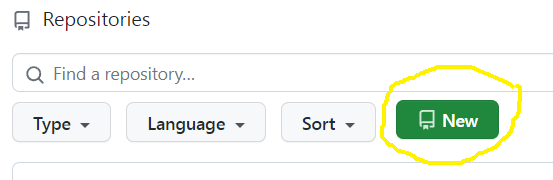
Create a new repository for this assignment by going to the CS450 Spring 2026 GitHub Organization and clicking "New".
Note: The CS450 Spring 2026 GitHub Organization must be the owner of the repository. Please do not create the repository in your own account.
On the "Create a new repository" screen:
Name the repository hw<X>-<LASTNAME>-<FIRSTNAME> where <X> is the current homework number.
For example, I would name my hw1 repository hw1-Chang-Stephen.
Mark the repository as Private.
Check "Add a README file".
Select the Racket template for the .gitignore.
Choose whatever you wish for the license.
When done click "Create repository".
Reading
Read Chapters 1.4-1.7 and 2.1-2.4 of the Textbook.
NOTE: The textbook will refer to "Student Languages" which we do not use in this course (and a "Stepper" that only works with the Student Languages). Instead, we use a version of Racket tailored for this course, which is invoked by putting #lang racket450 at the top of a file (see also Before Submitting).
Tasks
If you have decided to stay in this course, welcome! The first order of business is to make sure everyone has read the course website completely and understands the course policies. Confirm you have done this by answering a few online questions in gradescope.
For the rest of the hw, put your code in a file named hw1.rkt.
For this homework, imagine you are asked to create a game that has some "tokens", "cards", and "goals", each of which might have a cost and/or a point value. We will begin to implement such a game by writing functions to create images of these things.
For each of the listed functions below, before you begin to write code, create an example to make sure you understand what the function should do. You can use the REPL and the 2htdp/image library in DrRacket, or you can even draw it on paper initially. Make sure to do this before you begin to write the code of the function.
You might find The Image Guide and the 2htdp/image reference documentation in the Racket documentation helpful.
You may post any examples to Piazza to confirm your understanding of the problem.
DO NOT SKIP OR RUSH EXAMPLES! They will be worth many points in this course!
Only after you have created an example and confirmed that you clearly understand what the function should do, then implement the function. Do this for each function below. It should be much easier if you have created good examples.
To help you write each function, turn the example you already created into a test to help check it’s correctness.
Note: do not use check-expect from the Beginning Student Language (even though the textbook says to). Instead, use check-equal? which is built into racket450.
These Examples for a function definition should be put right after the define.
After you complete each function, using check-equal? again, write another test to further check that your function is correct.
Using the 2htdp/image library, write a function called pt-val-img that creates a 2htdp/image of a "point value" in the game.
A point value image is a solid gray square with sides of 50 pixels and a number centered in the middle. Then number should be black text and use font size 24.
The inputs to the function should bea number representing a point value that is to be rendered in the middle of the square
Using the 2htdp/image library, write a function called token-img that creates a 2htdp/image of a "token" in the game.
A token image is a solid circle with a number centered in the middle. The number should be black text and use font size 24.
The inputs to the function should bea number representing the radius of the circle
string representing the color of the circle (the string can be anything that makes image-color? evaluate to true)
a number representing some number of tokens, to be drawn in the middle of the image
Using the 2htdp/image library, write a function called card-img that creates a 2htdp/image of a "card" in the game.
A card image is a rectangle that can be thought to be divided into a top part and a bottom part.
The top part is a 160 pixel wide by 50 high rectangle of solid color. There is also a "point value" image overlaid on top of it, aligned to the left.
The bottom part is a 160 pixel wide by 150 high black-border outline rectangle. There is a "cost" token image, with radius 20, overlaid on top of it, aligned to the bottom right.
The inputs to the function should bea string representing the "color" of the card, which should be used as the fill color of the top part of the image
a numeric point value of the card
a string representing the color of the token on the card
a number representing the amount of the cost
Using the 2htdp/image library, write a function called goal-img that creates a 2htdp/image of a "goal" card in the game.
A goal card image is a 150 by 150 pixel white black border outline square that can be thought of as having 9 equal size 50 by 50 sections.
Overlaid on the top left is a point value image.
Overlaid across the bottom third are three cost token images side by side. Added 2026-02-05: Each token should inscribe one of the 50 by 50 sections and thus have a radius of 25.
The 7 inputs to the function should bea numeric point value of the card
three pairs of alternating token color strings and token cost numbers, to be used when drawing the token images on the bottom of the image
Before Submitting
Testing (and Autograders)
Before submitting, note:
Each programmer is solely responsible for testing their program to make sure it’s correct. Do not submit until all code has been has a "sufficient" number of Test cases that verify its correctness.
Note that there is no GradeScope "Autograder" available for students to use (an Autograder is not a software development/testing tool anyways, so it should not be used as one).
Thus, no questions mentioning an Autograder will be answered, e.g., posts asking "why is the Autograder giving an error?" are not allowed.
If you happen to find an Autograder and decide to look at its output despite this warning, please understand that it may be incorrect or incomplete, change at any time, or have random behavior, and that it in no way indicates the grade of the submitted hw.
Anyone that does get useful information from an Autograder, e.g., a failing test case or crashing code report, should treat it as bonus information (that you otherwise would not have had) that you and you alone must determine what to do with.
Regardless of what any Autograder might say, all code must still be independently tested to be correct before it is submitted.
The proper way to ask questions is with small code examples. This means that each question must include a small example code snippet along with what the "expected" result should be!
Further, any posted examples should contain the minimal amount of code needed to explain the question. Full file dumps or anything more than a few lines will not be accepted. More is not better. In fact it’s worse because it takes longer to read and is less likely to get a good answer.
Style
All code should follow proper Racket Style.
Also, the repository itself must follow proper style. Specifically, it must have appropriate commit messages. See How to Write a Git Commit Message if you are unsure how to write a commit message.
Note: Do not use the "file upload" feature on Github. The course staff may not accept hw uploaded in this way.
Files
A submission must have the following files in the repository root:
hw1.rkt: Contains the hw solution code.
The first line should be #lang racket450.
All defines should use the name specified in the exercise (ask if you are unsure).
README.md: Contains the required README information, including the GitHub repo url.
Submitting
When you are done, submit your work to Gradescope hw1. You must use the "GitHub" Submission Method and select your hw<X>-<LASTNAME>-<FIRSTNAME> repository.
Note that this is the only acceptable way to submit homework in this course. (Do not manually upload files and do not email files to the course staff. Homework submitted via any unapproved methods will not be graded.)
