Homework 2
Last updated: Tue, 3 Mar 2026 09:00:37 -0500
Out: Tue Feb 10 2026, 11am EST
Due: Tue Feb 17 2026, 11am EST
Overview
This assignment introduces The Design Recipe, a systematic way to write programs that are both correct and readable.
This hw will be graded accordingly:
confirm incremental programming pledge (separate Gradescope questions) (5 pts)
correctness (Autograded) (5 pts)
design recipe (10 pts)
testing (10 pts)
style (4 pts)
README (1 pt)
Setup
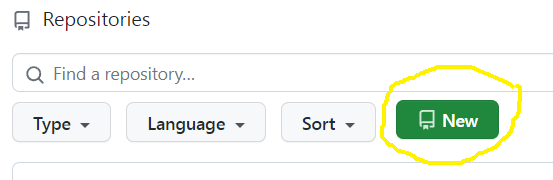
Create a new repository for this assignment by going to the CS450 Spring 2026 GitHub Organization and clicking "New".
Note: The CS450 Spring 2026 GitHub Organization must be the owner of the repository. Please do not create the repository in your own account.
On the "Create a new repository" screen:
Name the repository hw<X>-<LASTNAME>-<FIRSTNAME> where <X> is the current homework number.
For example, I would name my hw2 repository hw2-Chang-Stephen.
Mark the repository as Private.
Check "Add a README file".
Select the Racket template for the .gitignore.
Choose whatever you wish for the license.
When done click "Create repository".
Updating Racket450
Make sure you have the latest version of racket450.
To do this from DrRacket, go to File -> Package Manager -> Currently Installed, search for "racket450", and then click "Update".
Alternatively, if you prefer the command line, run:
raco pkg update racket450
Reading
Read Chapters 3.1-3.6 of the Textbook (where reading means trying to work through the examples and exercises interactively).
NOTE: The textbook will refer to "Student Languages" which we do not use in this course (and a "Stepper" that only works with the Student Languages). Instead, we use a version of Racket tailored for this course, which is invoked by putting #lang racket450 at the top of a file (see also Before Submitting).
Begin to read the The Design Recipe section of the course website (topics that will be covered in future lectures are marked as such).
Tasks
Course Policy Questions
The first task for this assignment is to make sure everyone understands The Incremental Programming Pledge, as well as some HW submission requirements. Confirm this by answering a few online questions in GradeScope.
Programming Tasks
In this assignment we’ll create a big-bang interactive program that could maybe eventually resemble a board game.
Here is an online demo that approximates the behavior of the program (JS demo may not be exactly the same as Racket implementation, presented as-is, no questions please).
The main code should go in a file named hw2.rkt that uses #lang racket450, as described in lecture and shown in the hw2 starter code. Tests should go in a tests.rkt hw2-tests.rkt file that uses the #lang racket450/testing language.
NOTE: The submitted program must be only a series of defines (both constants and function definitions are allowed). It should not run any code (e.g., it should not start the big-bang loop automatically!). Not following this will result in GradeScope errors and/or timeouts.
NOTE: Starting with this assignment, all code you write must now follow the The Design Recipe. (Just submitting code is no longer sufficient and submissions will be graded on more than an autograder correctness score.)
This means that some language features may only be used in the correct scenarios, as called for by The Design Recipe.
For example, set! and other "imperative" features are not allowed ever.
In this assignment, conditionals such as if and cond are not allowed either, since they are only to be used with Data Definitions that we have not covered yet.
Signatures should use define/contract and the predicates defined in the Data Design Recipe step.
For Examples and Tests, do not use check-expect from the Beginning Student Language (even though the textbook says to). Instead, use check-equal? or other testing forms from rackunit (which are built into racket450).
Examples for a function definition should be put before the define. Tests should be put into tests.rkt hw2-tests.rkt. Try to think about corner cases and code coverage.
In this assignment, each function should have at minimum one Example, and "sufficient" Tests.
High-Level "Game" Specifications
The "game" for this assignment involves only a single "player"
The game has MAX-TOKENS = 10 "blue" tokens and the player starts with none of them. There are no other components in the game for this assignment.
During a "turn", the player may do one of two things: acquire or spend a token. When this occurs, the player’s token count should be increment or decremented by 1, respectively. UPDATE: When a player spends a token, it goes back into the "unowned" pile.
If a player already has all the tokens and then attempts to acquire another one, nothing should happen
Similarly, if a player with no tokens attempts to spend one, nothing should happen.
Data Definitions
The first step of any programming task is Data Design, i.e., defining the data types that the code will operate on.
Do not start writing any code until you have done this Data Design step.
a Data Definition named NumTokens that represents some token count. Remember that the game only has MAX-TOKENS total, and at any point in the game the "player" will own some number of them.
a Data Definition named GameState that represents the current state of the big-bang "game". You will need to decide what this data definition represents, i.e., the interpretation of this data definition, and there may be more than one choice. For example, you might choose to have the GameState be the number of tokens owned by the player, or the number of tokens that are unowned.
Also, remember that such a big-bang "world state" data definition should be ideally as small as possible and only include values that change. Constant values should be defined as constants.
all the required components of each Data Definition, e.g., predicates like GameState?, which should return true when given a value that is a valid GameState,
a constant INIT-GAMESTATE that is the initial GameState. The value of this constant will depend on your GameState data definition, but (GameState? INIT-GAMESTATE) should always evaluate to true.
Functions
a function draw-gamestate, with Signature GameState -> Image (Image is a built-in basic data definition from 2htdp/image where (image? i) evaluates to true if i is a valid Image), that is given to big-bang’s to-draw clause (See below).
The GameState Image should be an 800 pixel by 800 empty-scene (a "scene" is the same as an Image) that has a 400 x 400 black-border "outline" square "board" drawn on top, exactly in the middle of the scene. The "board" itself should show the number of unowned tokens remaining, also centered in the middle. To draw the tokens, use your token-img function (from Homework 1) with a radius of TOKEN-SIZE = 40 pixels.
Below the "board" should be the "player area", which is 400 by 200 black-border "outline" rectangle with the number of tokens owned by the player drawn on top (same size as above), centered in the middle.
a key handler function called handle-key with Signature GameState KeyEvent -> GameState (KeyEvent is an enumeration data definition from 2htdp/universe, where (key-event? k) evaluates to true if k is a valid KeyEvent).
The function it should respond to "a" and "s" keyboard presses, which "acquire" and "spend" one token, respectively. All other key presses should be ignored, i.e., should not change the GameState.
a function player-token-count with Signature GameState -> NumTokens that returns the number of tokens owned by the player
a function acquire-token with Signature NumTokens -> NumTokens that increments a player’s token count by 1. If there are no tokens remaining to acquire, then the count should stay the same.
a function spend-token, with Signature NumTokens -> NumTokens that decrements a player’s token count by 1. If there are no tokens to spend, then the count should stay the same.
a function run that takes no arguments and starts the big-bang interactive loop
The big-bang expression should:
Before Submitting
Testing (and Autograders)
Before submitting, note:
Each programmer is solely responsible for testing their program to make sure it’s correct. Do not submit until all code has been has a "sufficient" number of Test cases that verify its correctness.
Note that there is no GradeScope "Autograder" available for students to use (an Autograder is not a software development/testing tool anyways, so it should not be used as one).
Thus, no questions mentioning an Autograder will be answered, e.g., posts asking "why is the Autograder giving an error?" are not allowed.
If you happen to find an Autograder and decide to look at its output despite this warning, please understand that it may be incorrect or incomplete, change at any time, or have random behavior, and that it in no way indicates the grade of the submitted hw.
Anyone that does get useful information from an Autograder, e.g., a failing test case or crashing code report, should treat it as bonus information (that you otherwise would not have had) that you and you alone must determine what to do with.
Regardless of what any Autograder might say, all code must still be independently tested to be correct before it is submitted.
The proper way to ask questions is with small code examples. This means that each question must include a small example code snippet along with what the "expected" result should be!
Further, any posted examples should contain the minimal amount of code needed to explain the question. Full file dumps or anything more than a few lines will not be accepted. More is not better. In fact it’s worse because it takes longer to read and is less likely to get a good answer.
Style
All code should follow proper Racket Style.
Also, the repository itself must follow proper style. Specifically, it must have appropriate commit messages. See How to Write a Git Commit Message if you are unsure how to write a commit message.
Note: Do not use the "file upload" feature on Github. The course staff may not accept hw uploaded in this way.
Files
A submission must have the following files in the repository root:
hw2.rkt: Contains the hw solution code.
The first line should be #lang racket450.
All defines should use the name specified in the exercise (ask if you are unsure).
hw2-tests.rkt: This file should use the #lang racket450/testing language.
It should also require hw2.rkt and define tests for it.
Specifically, it should contain "sufficient" Test cases (e.g., check-equal?, etc.) for each defined function.
README.md: Contains the required README information, including the GitHub repo url.
Submitting
When you are done, submit your work to Gradescope hw2. You must use the "GitHub" Submission Method and select your hw<X>-<LASTNAME>-<FIRSTNAME> repository.
Note that this is the only acceptable way to submit homework in this course. (Do not manually upload files and do not email files to the course staff. Homework submitted via any unapproved methods will not be graded.)
